
Download the AIMW Conference App
To get started:
- Go to the App Store on your iOS or Android device by clicking or scanning the correct QR code below.
- Search for “AAIM Events” to download the free app.
- Once you open the app, select the logo for the event you wish to access: Academic Internal Medicine Week.
- Press the "Select event" button at the bottom of your screen to load the event.
- Customize your experience by using the menu along the bottom of the screen.
 |  |
On the AIMW App you can:
- View the full conference schedule and sort by day, attendee track, content track, or keyword
- Design your own schedule, and synchronize your agenda across devices
- Chat and message with other attendees
- Access the attendee directory
- Find Wi-Fi details
- View available presentations and handouts
- Complete workshop evaluations
- Get notifications about the conference, including session updates and other announcements
- Access partner directory
- Connect to your own social media platforms, such as Twitter and Facebook
- Access other key details about the meeting, including health and safety information, maps for the meeting space, CME information, and much more
Conference App FAQs
Select the “More” menu option (lower right iOS; upper right Android). Choose Change Event from top left. Then select the logo for the current Academic Internal Medicine Week. Press the “Select this Event” button in the lower right corner, then select the continue button to load the event.
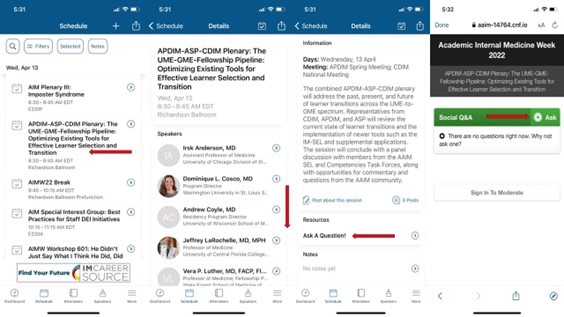
After selecting an individual session, check the Resources section for the “Ask a Question” button. Select that button and a new screen will load for you to type your question, read questions asked by others, or up vote questions asked by others.
Yes! Once you login to the app, select the "Partner" tab to scroll to the partner you wish to contact. Select "Contact" to send a message within the app or click their included email address to send a message in your default email client. Alternatively, you can find individual representatives in the participant list and click "Send Message" underneath their photo.
If AIMW is not showing in your list of upcoming events that means your version of AAIM Events app is not up-to-date. To update your app, go to App Store on your device and find “AAIM Events” in your list of available app updates and complete the update. AIMW will now display in your upcoming events list.
Yes! A web version of the app will be available shortly so all attendees can enjoy all the same features.